 EmailSlim
Reclaim Your Email Storage in Minutes
Instantly identify the senders and attachments wasting the most space. Delete thousands of emails safely — without ever reading your content.
Already have an account? Log in →
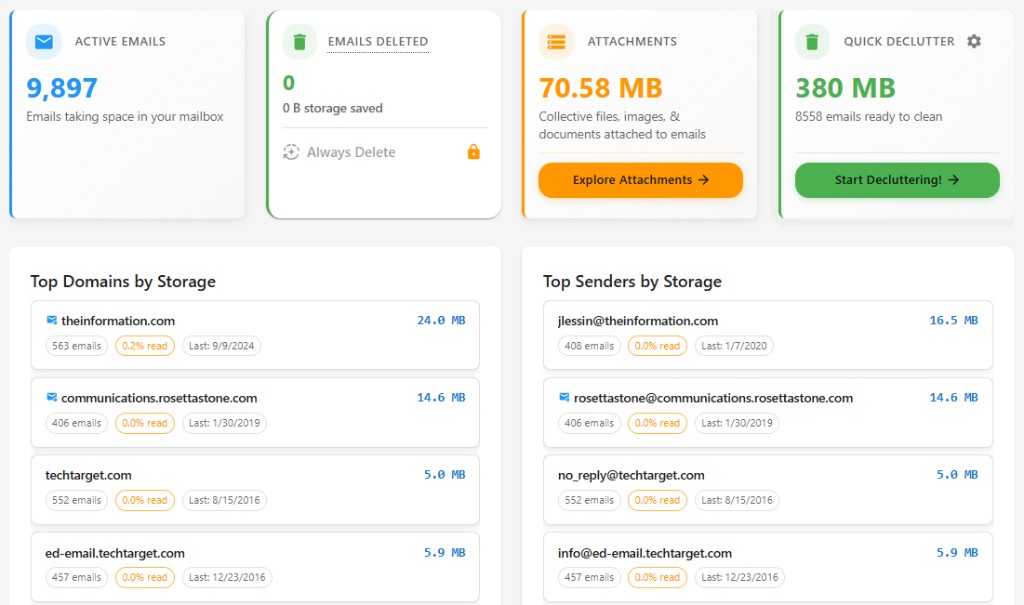
Example EmailSlim dashboard — ranked by storage with quick declutter actions
Key Features
Ranked by storage size
See who uses the most space
Bulk delete safely
Nothing removed until you approve
Metadata only
We never read your email content
How we show storage & why it's hard to see in your inbox
Inbox search only works when you know what you're looking for — most storage hogs hide across thousands of messages. Example: 5,000 emails at 2MB each = 10GB of space, but your inbox won't show this unless you manually search.
EmailSlim analyzes your inbox metadata and ranks senders and attachments by storage usage automatically, so you can see which senders are the real storage culprits.
Ranked by total sender storage
Most inbox tools guess. We rank by actual storage size.
See which domains and senders use the most space. No guessing—delete the biggest first.
Top storage hogs
Sample inbox data (simulated, not live)newsletter@retailer.com
8,231 emails
2.4GB
deals@travelportal.com
3,104 emails
1.2GB
updates@saasapp.com
1,987 emails
740MB
Account storage
5.6 GB of 15 GB used
Delete 2.4GB in one click
That's 8,231 emails removed instantly.
How It Works
Connect your email provider securely (OAuth)
Sign in with your Google or Microsoft email provider (Gmail, Microsoft Outlook, Hotmail, MSN, Live.com, or Microsoft 365) using secure OAuth. EmailSlim uses official APIs to access only email metadata—sender, date, size, and labels. We never read your email content.
Scan metadata only
EmailSlim analyzes email metadata only—sender, date, size, labels—to identify the biggest senders and largest emails using your storage. The free scan analyzes your first 500 emails. We never read email content. Ever.
We never read email content. Ever.Delete the biggest storage hogs — safely
Review what's using your storage and delete the biggest space hogs. All deletions happen in your inbox when you approve them. Emails go to Trash (or Deleted Items) first, where you can recover them for 30 days.
Real Results from Users
10GB+ freed
Typical cleanup — in about 20 minutes
8,000+ emails
Deleted in one session — safely, with one click
100% metadata
Privacy first — we never read your email content
"I freed up 12GB of storage in under 10 minutes. EmailSlim showed me exactly which senders were using the most space, and I was able to delete thousands of old promotional emails I'd never read."
— EmailSlim user
Choose Your Plan
Prices depend on how many emails we scan (tiers up to 150k). After you sign in, we show your suggested tier and the exact amount before you pay.
One-Time Cleanup
$2.99 – $6.99
One-time fee by mailbox tier (not a flat rate for every inbox)
Set & Forget Automation
Cleans your inbox daily without lifting a finger.
$2.50 – $5.99/mo
By mailbox tier; cancel anytime
Annual Subscription
$24.99 – $64.99/yr
By mailbox tier
Want automation or annual savings? See all plans on the full .
Why Built-In Email Search Isn't Enough
Supports Gmail, Microsoft Outlook, Hotmail, MSN, Live.com, and Microsoft 365
Here's how EmailSlim differs in its storage-first approach.
| Feature | Gmail Search | Clean Email | EmailSlim |
|---|---|---|---|
| Total sender storage ranking | No total storage view | Not applicable | Ranked by storage instantly |
| Shows large attachments | Manual filters only | Not applicable | Ranked by storage instantly |
| Bulk deletion by storage | Manual filters only | Not applicable | Bulk delete safely by storage |
| Insight-first analysis | Manual filters only | Not applicable | Yes — insight-first |
| Automation options | Not applicable | Not applicable | Optional automation |
| Automation (Always Delete) | Not applicable | Not applicable | Yes — automation available |
Frequently Asked Questions
Is there a free scan?
Yes. EmailSlim includes a free scan of your first 500 emails for any supported account. No credit card and no subscription required.
Does EmailSlim read my emails?
No. EmailSlim never reads your email content. We only analyze email metadata—sender, subject line, date, size, and labels—to provide cleanup recommendations and search.
How does OAuth work?
You connect with Google or Microsoft using secure OAuth sign-in. They grant EmailSlim access to email metadata only, and you can revoke access anytime from your account settings.
Can I undo deletions?
Yes. Deleted emails go to Trash or Deleted Items first, where you can usually recover them for about 30 days (exact timing depends on your provider).
What's taking up space in my email?
Most storage comes from old newsletters, promotions, and large attachments. EmailSlim ranks senders and domains by total storage so you can see the real culprits.
How much storage space can I free up?
Many users free up 10GB+ in a single cleanup. Your results depend on how many old emails and attachments you have, but we show the exact storage impact before you delete anything.
Is there a subscription?
No subscription is needed for the free scan. You can upgrade later for one-time cleanup or ongoing automation if you want more than 500 emails.
How do I bulk delete emails safely?
EmailSlim groups high-volume senders so you can review them, then bulk delete thousands of emails at once. Nothing is permanently removed until you approve it in your inbox.
Does EmailSlim work with Outlook or Microsoft 365?
Yes. EmailSlim supports Gmail, Outlook.com, Hotmail, Live.com, and Microsoft 365 with the same storage insights and safe bulk delete tools.
Want the full details? Review our and .
Your data stays in your inbox. All deletions happen in your account.
Ready to Reclaim Your Email Storage?
Scan your first 500 emails free. No subscription required. See which senders and emails are consuming the most storage space across Gmail, Outlook, and Microsoft 365. You choose what to delete.
Works with Gmail, Microsoft Outlook, Hotmail, MSN, Live.com, and Microsoft 365
Supports Gmail, Microsoft Outlook, Hotmail, MSN, Live.com, and Microsoft 365