
Bulk Delete Emails — Fast & Safe
To bulk delete emails, search by sender in Gmail or Outlook, select all matching messages, then delete and empty Trash or Deleted Items. Or use EmailSlim to rank every sender by total storage used and bulk delete the biggest space-wasters first — free scan of your first 500 emails.
Last updated: June 2026Need to bulk delete emails in Gmail or Outlook? EmailSlim shows you which senders are using the most storage — so you can delete intelligently, not manually.
Your email content stays private — we only analyze metadata
EmailSlim never deletes emails. All deletions happen in your inbox when you approve them.
Example: 6,400 emails × 180KB = 1.1GB reclaimed.
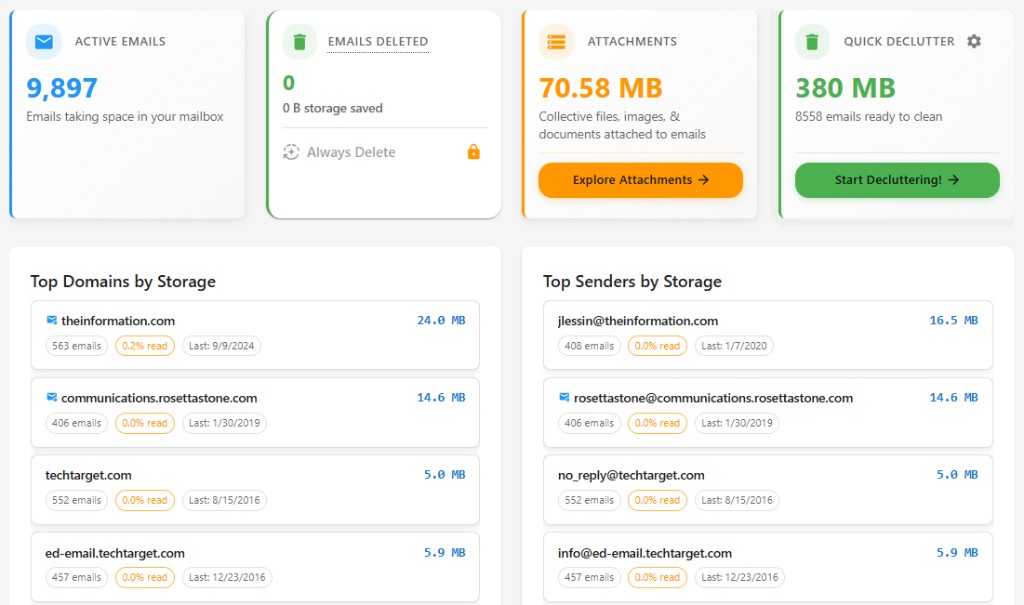
Ranked by total sender storage
See which domains and senders use the most space. No guessing—delete the biggest first.
Top storage hogs
Sample inbox data (simulated, not live)newsletter@retailer.com
8,231 emails
2.4GB
deals@travelportal.com
3,104 emails
1.2GB
updates@saasapp.com
1,987 emails
740MB
Choose your provider
Gmail users
Use EmailSlim to see which senders are using the most Gmail storage, then bulk delete thousands of emails at once. Deleted messages go to Gmail Trash (30-day recovery).
Microsoft users
Use EmailSlim with Outlook.com, Hotmail, or Microsoft 365 to find storage hogs and bulk delete. Deleted messages go to Deleted Items (recovery depends on your account).
Why Use EmailSlim for Bulk Email Deletion?
Bulk delete emails safely in minutes
Delete thousands of emails with one click
Identify and remove promotional emails automatically
Free up storage space quickly
One-click unsubscribe and delete
Privacy-first: never reads your email content
Bulk Delete Emails FAQs
What is the fastest way to bulk delete emails?
Search by sender in Gmail or Outlook, select all matching messages, then delete. The catch is knowing which senders to target — neither provider shows storage per sender. EmailSlim ranks every sender and domain by total storage used, so you bulk delete the biggest space-wasters first instead of guessing.
Are bulk deleted emails gone forever?
No. Deleted emails go to Gmail Trash (recoverable for about 30 days) or Outlook Deleted Items first, so you can restore them if you change your mind. To actually reclaim the storage immediately, you need to empty the Trash or Deleted Items folder after deleting.
Is it safe to bulk delete emails with EmailSlim?
Yes. EmailSlim analyzes metadata only — sender, date, and size — and never reads your email content. Nothing is ever deleted without your approval: all deletions happen in your own inbox when you click delete, and they go to Trash or Deleted Items first so they are recoverable.
Which email providers does this work with?
EmailSlim works with Gmail, Google Workspace, Outlook.com, Hotmail, and Microsoft 365. You sign in securely via OAuth with your Google or Microsoft account, and the sender-ranking and bulk delete workflow is the same on both providers.
Do I need to install anything?
No. EmailSlim works in any browser — there is nothing to download or install. You can start with a free scan of your first 500 emails, and no credit card is required.