
Delete Old Gmail Emails - Free Up Space
To delete old Gmail emails, type older_than:1y in Gmail's search bar, select all matching conversations, delete them, then empty Trash to actually reclaim the storage. Or use EmailSlim to see which senders use the most space and delete old emails from the biggest senders first — free scan of your first 500 emails.
Last updated: June 2026Deleting old emails in Gmail can be tedious. Filters don't show cumulative storage impact. EmailSlim shows you which senders use the most space so you can delete old Gmail emails intelligently.
Your email content stays private - we only analyze metadata
EmailSlim never deletes emails. All deletions happen in your inbox when you approve them.
How to Delete Old Gmail Emails (Step-by-Step)
Gmail has a built-in way to find old emails by age. Here's the manual method — and the key limitation.
Use the older_than: search filter
In Gmail's search bar, type older_than:1y to find all emails older than one year. Use older_than:6m for 6 months, older_than:2y for two years, and so on.
Select all conversations
Click the checkbox at the top of the list to select the current page. Then click "Select all X conversations that match this search" to include all results, not just page one.
Delete — emails go to Gmail Trash
Click the trash icon. Emails move to Gmail Trash, where they stay for about 30 days before Gmail auto-deletes them. You can restore any email from Trash before then.
Empty Trash to reclaim storage now
Gmail Trash still counts toward your storage quota until it is emptied. Go to Trash → "Empty Trash now" to reclaim the space immediately.
The limitation: Gmail filters by age, not storage impact
older_than: finds old emails, but Gmail gives you no way to see which senders are responsible for the most storage. A newsletter you've received 3,000 times may be using gigabytes — but it only shows up as individual rows with no cumulative size. EmailSlim ranks senders by total storage so you delete what actually matters first.
Why Delete Old Gmail Emails with EmailSlim?
Delete old Gmail emails automatically
Identify emails older than your specified date
Bulk delete thousands of old emails safely
Free up storage space from old messages
One-click delete for old promotional emails
Privacy-first: never reads your email content
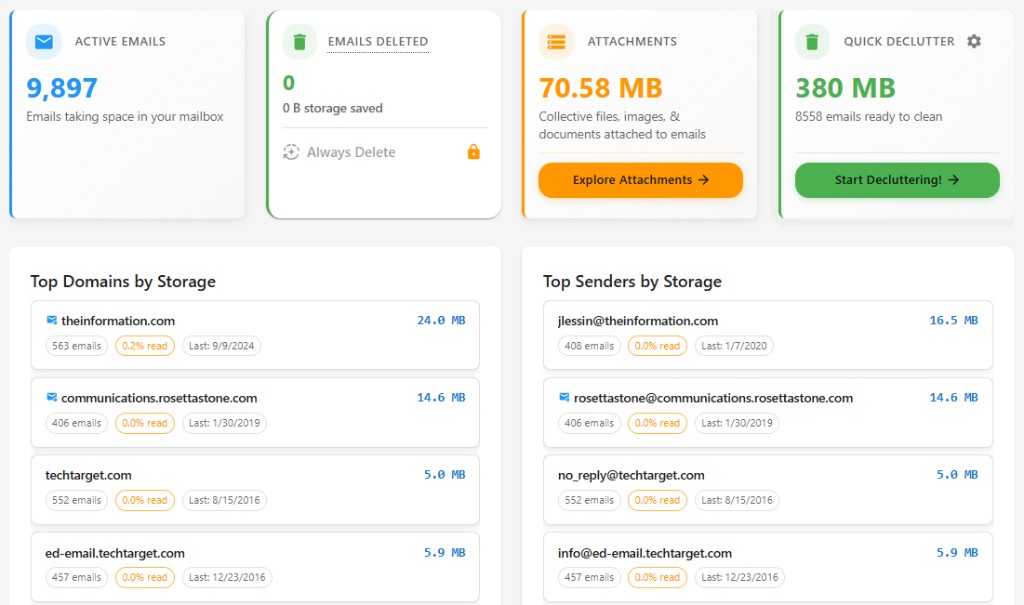
Ranked by total sender storage
See which domains and senders use the most space. No guessing—delete the biggest first.
Top storage hogs
Sample inbox data (simulated, not live)newsletter@retailer.com
8,231 emails
2.4GB
deals@travelportal.com
3,104 emails
1.2GB
updates@saasapp.com
1,987 emails
740MB
Delete Old Gmail Emails FAQs
How do I find Gmail emails older than a year?
Type older_than:1y in Gmail’s search bar to find all emails older than one year (use older_than:6m for six months, older_than:2y for two years, and so on). Then click the top checkbox and "Select all conversations that match this search" to select every result, not just the first page.
Does deleting old Gmail emails free up storage immediately?
No. Deleted emails move to Gmail Trash, where they still count toward your storage quota until Trash is emptied. Go to Trash and click "Empty Trash now" to reclaim the space immediately, or wait about 30 days for Gmail to empty it automatically.
Are deleted Gmail emails recoverable?
Yes, for about 30 days. Deleted emails sit in Gmail Trash and can be restored anytime during that window. EmailSlim never bypasses this — every user-approved deletion goes to Trash first, so you always have time to change your mind.
Why is my Gmail storage still full after deleting old emails?
Two common reasons. First, Gmail’s free 15GB is shared with Google Drive and Google Photos, so email cleanup is only part of the picture. Second, deleted emails keep counting toward your quota until you empty Trash — and age filters don’t show which senders use the most space, so you may be deleting emails that barely move the needle. EmailSlim ranks senders by total storage so you target the biggest first.
Does EmailSlim read my Gmail messages?
No. EmailSlim analyzes metadata only — sender, date, and size — and never reads your email content. You sign in with your Google account via OAuth, and nothing is deleted until you approve it. It works with personal Gmail and Google Workspace accounts in any browser.
Need to bulk delete Gmail emails by sender? Or use our Gmail storage cleanup tool to free space fast.
All providers: bulk delete emails. Using Outlook? delete old Outlook emails. Gmail vs Outlook storage limits.
Using Outlook, Hotmail, or Microsoft 365?