
Delete Old Emails - Free Up Space
To delete old emails, search older_than:1y in Gmail or sort by date in Outlook, select all matching messages, then delete and empty Trash or Deleted Items. Or use EmailSlim to rank every sender by total storage used, so you delete the old emails that actually free up space — free scan of your first 500 emails.
Last updated: June 2026Deleting old emails in Gmail or Outlook can be tedious. Filters don't show cumulative storage impact. EmailSlim does.
Your email content stays private - we only analyze metadata
EmailSlim never deletes emails. All deletions happen in your inbox when you approve them.
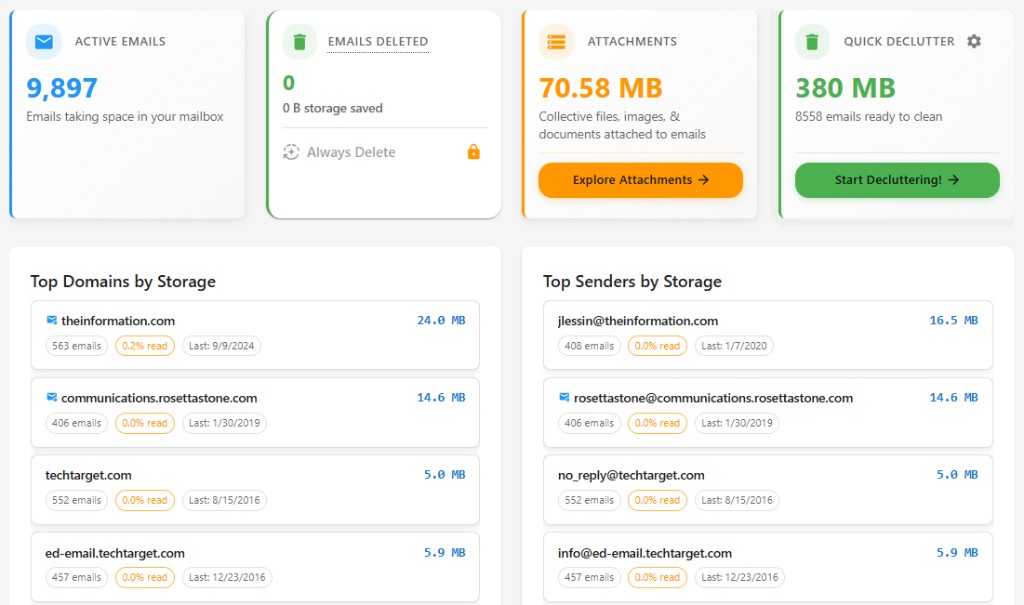
How to Delete Old Emails (Step-by-Step)
The manual method works but has a key limitation. Here's how it works — and the smarter alternative.
Open Gmail or Outlook
In Gmail, type older_than:1y in the search bar to find emails over a year old. For Outlook, use the filter menu to sort by date and select messages before a specific date.
Select all matching emails
In Gmail: click the checkbox at the top, then "Select all X conversations that match this search" to go beyond the first page. In Outlook: Ctrl+A selects visible messages in the folder.
Delete — they go to Trash first
Deleted emails move to Gmail Trash (recoverable for ~30 days) or Outlook Deleted Items. To reclaim storage immediately, empty the Trash / Deleted Items folder after deleting.
Repeat per sender or label
The manual method requires you to repeat this for each sender or label. There is no way to see which senders account for the most storage before you start deleting.
The problem with manual deletion
Gmail and Outlook filter by age, not size. An email from 6 months ago with a 25 MB attachment wastes far more space than 50 old newsletters combined. The manual method has no way to show which senders account for the most storage — so you end up deleting by guesswork.
Ranked by total sender storage
See which domains and senders use the most space. No guessing—delete the biggest first.
Top storage hogs
Sample inbox data (simulated, not live)newsletter@retailer.com
8,231 emails
2.4GB
deals@travelportal.com
3,104 emails
1.2GB
updates@saasapp.com
1,987 emails
740MB
Manual search vs sender-based view
Manual search (inbox filters)
Search by date or sender one at a time. No view of total storage per sender — you guess which senders to clean.
Hard to see cumulative impact: thousands of small emails from one sender can add up to gigabytes.
EmailSlim sender-based view
See which senders use the most storage, ranked by total size. Delete old emails by sender — not by guesswork.
One view shows cumulative impact so you reclaim space where it matters.
Why Delete Old Emails with EmailSlim?
Delete old emails automatically
Identify emails older than your specified date
Bulk delete thousands of old emails safely
Free up storage space from old messages
One-click delete for old promotional emails
Privacy-first: never reads your email content
Delete Old Emails FAQs
Does deleting old emails free up storage immediately?
Not right away. Deleted emails move to Gmail Trash or Outlook Deleted Items first, and they still count toward your storage quota while they sit there. To reclaim the space immediately, empty the Trash or Deleted Items folder after deleting.
Can I recover old emails after deleting them?
Yes, for a while. In Gmail, deleted emails stay in Trash for about 30 days and can be restored anytime before then. In Outlook, deleted emails go to the Deleted Items folder first, so you can move them back before they are permanently removed.
Should I delete old emails by age or by size?
Age alone is a poor guide. Gmail and Outlook filter by date, not storage impact — a single old email with a 25 MB attachment wastes far more space than dozens of old newsletters. EmailSlim ranks senders and domains by total storage used, so you delete the old emails that actually free up space.
Is EmailSlim safe to use on my inbox?
Yes. EmailSlim analyzes metadata only — sender, date, and size — and never reads your email content. It never deletes anything on its own: every deletion is approved by you and goes to Trash or Deleted Items first, so it stays recoverable.
Do I need to install anything to get started?
No. EmailSlim works in any browser with no download required. You sign in with your Google or Microsoft account via OAuth and get a free scan of your first 500 emails — no credit card needed.